wifi.wavlink.com Login: Default IP & Password

I have watched a Wavlink extender setup stall at the login page more than once….
I have watched a Wavlink extender setup stall at the login page more than once. You plug the extender in, open wifi.wavlink.com, and nothing loads, or the password you typed gets rejected.
The fix is usually small: the right address, the right default password, and a connection to the extender itself. This guide gives you all three, plus the fallback IP and the steps I use when the page will not open.
Log in at wifi.wavlink.com with the username admin and the password admin. If the page does not load, use 192.168.10.1 instead.
The fastest way in: tap the button below, then sign in with the details in the box.
Address: wifi.wavlink.com
Username: admin
Password: admin
Login to Admin Panel →This button opens your Wavlink device’s own login page. It works only when your device is connected to that Wavlink device, by WiFi or cable.
wifi.wavlink.com Default Login Details
I checked these defaults against the Wavlink quick guides.
| Detail | Value |
|---|---|
| Login address | wifi.wavlink.com |
| Fallback IP | 192.168.10.1 |
| Username | admin |
| Password | admin |
| Default 2.4G SSID | WAVLINK-N |
| Default 5G SSID | WAVLINK-AC |
Some newer models ask you to create a new login password on the first login instead of accepting admin. That password then becomes the admin password.
Change the admin password once you are in, because the factory password is the same on every unit.
How to Log in via wifi.wavlink.com
I use this order every time. Connect to the extender first, then open the address.
- Plug the extender into a power outlet and wait until the power LED turns solid.
- Connect your phone or computer to the extender’s WiFi, WAVLINK-N or WAVLINK-AC, or use an Ethernet cable.
- Open a browser and type wifi.wavlink.com in the address bar. Do not search for it in Google.
- Type admin in the username field and admin in the password field, then click Log In.
- If the setup wizard opens, pick your home WiFi network, type its password, and set a new admin password.
The wizard then asks you to pick a mode, such as Repeater or AP.
Wavlink Devices Using wifi.wavlink.com
The same address works on every Wavlink extender and access point I have checked, from indoor plug-in units to outdoor and WiFi 6 models.
| Model | Type |
|---|---|
| WL-WN575A2 / WL-WN575A3 | AC1200 dual-band WiFi extender |
| WL-WN578A2 / WL-WN578A3 | AC1200 dual-band WiFi extender |
| WL-WN570HA1 | AC600 outdoor WiFi extender / AP |
| WL-WN570HN2 | N300 outdoor WiFi extender / AP |
| WL-WN572HG3 (AERIAL HD4) | AC1200 outdoor WiFi extender / AP |
| WN583AX3 | AX3000 WiFi 6 extender |
| WL-WN573HX1 | AX1800 outdoor WiFi 6 extender |
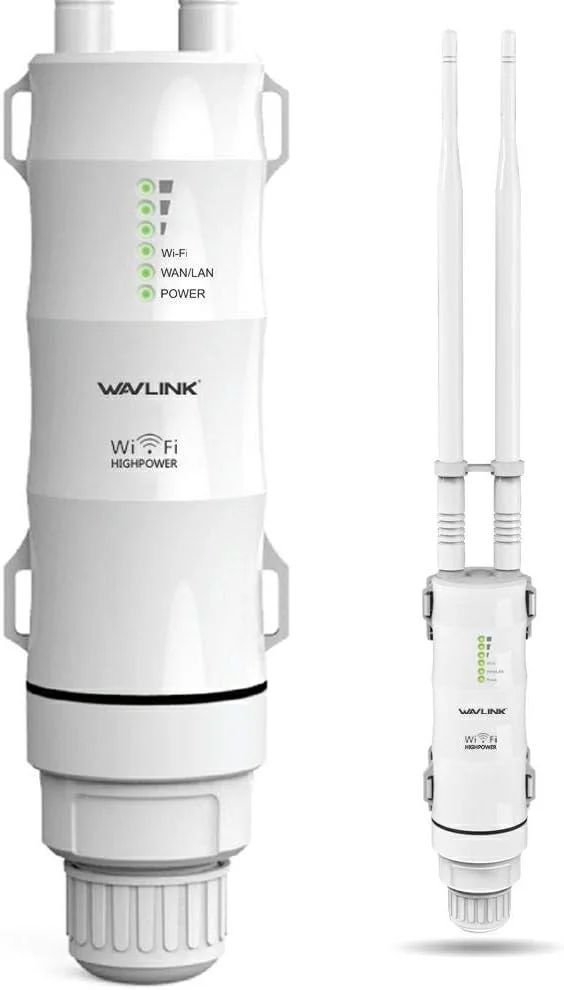
If your model is not in this table, the address still works the same way. I check the label on the device when a model asks for something different.
wifi.wavlink.com Not Opening?
I start with the connection, because that is where most login failures begin. I work through this list in order.
- Connect to the extender’s WiFi, WAVLINK-N or WAVLINK-AC, not your main router or mobile data.
- Type the address in the address bar, not a search box. Try 192.168.10.1 if wifi.wavlink.com does not load.
- Try a different browser, or clear the browser cache and try again.
- Set your computer’s IP to 192.168.10.2, subnet mask 255.255.255.0, then try the address again.
- Restart the extender: unplug it, wait 30 seconds, and plug it back in.
If you changed the admin password and forgot it, reset the router to factory settings: hold the reset button 6 to 10 seconds until the LEDs flash. Then log in again with admin and set the extender up from scratch.
If you are not sure which network your device joined, our Router IP Finder walks you through finding the right gateway. Our What Is My IP tool shows the address your connection uses.