www.linksyssmartwifi.com Login & Password

I have watched plenty of Linksys owners type linksyssmartwifi.com into a browser and land on…
I have watched plenty of Linksys owners type linksyssmartwifi.com into a browser and land on a sign-in page that asks for an email, not a router password. That mismatch is where most people get stuck.
Linksys also started winding down its Smart Wi-Fi cloud service in March 2026, so the page may not even open the way it used to. This guide shows you both ways in: the cloud sign-in and the local login that still works.
Log in to www.linksyssmartwifi.com with the email and password of the Linksys cloud account you created during setup. There is no factory username and password for the cloud page. For local access, open 192.168.1.1 and enter the router password — admin on an unconfigured router.
The fastest way in: tap the button below, then sign in with the local details in the box.
IP Address: 192.168.1.1
Username: admin
Password: admin
Login to Admin Panel →This button opens our 192.168.1.1 guide. From there, one more tap takes you to your router’s own login page. It works only when your device is connected to this router, by WiFi or cable.
On some Linksys models the username field is blank. The password is still admin on an unconfigured router.
How to Log in via linksyssmartwifi.com
I always start with the cloud page, because that is the address most people search for. If it opens, you are two fields away from your settings.
Cloud login with your Linksys account
- Connect your computer or phone to your Linksys Wi-Fi network.
- Open a browser and type linksyssmartwifi.com in the address bar, then press Enter.
- Type the email address and password of your Linksys cloud account, then click Sign In.
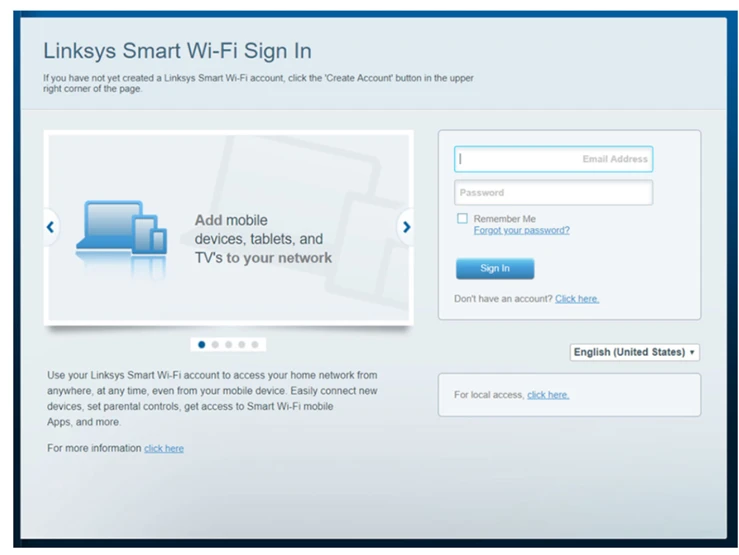
I treat the cloud sign-in as the remote option. It only works if you created a Linksys cloud account when you set the router up, and Linksys no longer lets you create new cloud accounts.
Local login at 192.168.1.1
- Connect to the Linksys network by Wi-Fi or cable.
- Open a browser and go to 192.168.1.1, or type myrouter.local.
- If the cloud sign-in page appears, click “For local access, click here.”
- Type your router password and click Sign In. On an unconfigured router, the password is admin.
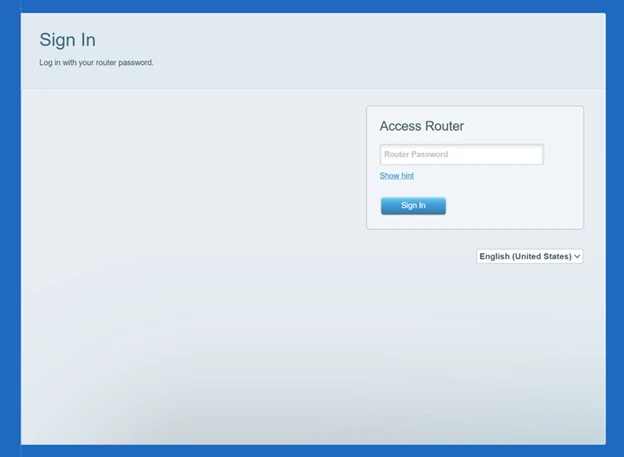
I use the local path whenever the cloud page stalls. It talks straight to the router in your home, so it works even when your internet connection is down.
www.linksyssmartwifi.com Default Login
I check the label on the router before I trust any default. The cloud page and the local page do not share one login, and mixing them up is the most common mistake I see.
| Login | Username | Password |
|---|---|---|
| Cloud sign-in (linksyssmartwifi.com) | Your email address | The password you created for your Linksys cloud account |
| Local login (192.168.1.1) | admin (blank on some models) | admin on an unconfigured router |
There is no factory default for the cloud page, because it is an account you created. If you never created a Linksys cloud account, skip the cloud page and log in locally.
Newer Linksys models may ask you to create a router password the first time you log in. That password then replaces admin, so keep it somewhere safe. If your router is a different Linksys model, our Linksys router login guide lists the defaults for the whole brand.
Forgot Your Linksys Smart Wi-Fi Password?
I start with the reset link on the page in front of me. It is faster than a factory reset, and it keeps every other setting intact.
- On the cloud sign-in page, click “Forgot your password?” and follow the emailed reset link.
- For a local login, click “Reset password” on the sign-in page, then type the recovery key printed on the router’s product label.
- Create a new router password, add a hint if you like, and click Reset.
If you cannot find the recovery key or the reset link fails, reset the router to factory settings and set it up again. Our guide to resetting a router walks through the button hold and the setup that follows.
www.linksyssmartwifi.com Not Opening?
I work through this list in order, because the fix is usually in the first two checks. Most “page not opening” cases are a connection problem, not a router problem.
- Make sure your device is on the Linksys Wi-Fi network, not mobile data or a neighbour’s network.
- Type the address into the browser’s address bar, not a search box. Try linksyssmartwifi.com first, then 192.168.1.1.
- Try a different browser, or clear the cache and try again.
- Restart the router: unplug it, wait 30 seconds, and plug it back in.
If the cloud page still will not load, remember that Linksys began discontinuing Smart Wi-Fi cloud services on March 26, 2026. On the latest firmware, desktop access through linksyssmartwifi.com is no longer supported. Log in locally at 192.168.1.1 instead — that path still works.